Bushel
- 2.7
- Rating
- 50.00K
- Installs
- Free
- Price

 Analysis by App-foxy
I approached Bushel as a practical business app for people who need to keep an eye on farm activity and finances while moving between the office, the yard, and the fields. Its purpose is easy to understand: bring important farm information into one place instead of leaving every decision to paper notes, separate spreadsheets, or memory. That focus makes it appealing, but it also means the experience depends heavily on how clearly information is presented and how comfortable you are working with financial details on a mobile screen.
Developed by Bushel, the app is free to download and is rated for Everyone. It has been available since July 25, 2012, and its current version is 9.0.1, with support beginning at iOS 9. The app has passed the fifty-thousand-install mark and holds an average rating of 2.7 from roughly four hundred seventy ratings, alongside about one hundred fifty written reviews. Those figures suggest a product with a real audience but also a mixed experience, so I would not recommend installing it without first considering how well its workflow matches your farm or agricultural business.
How clearly the app presents farm information
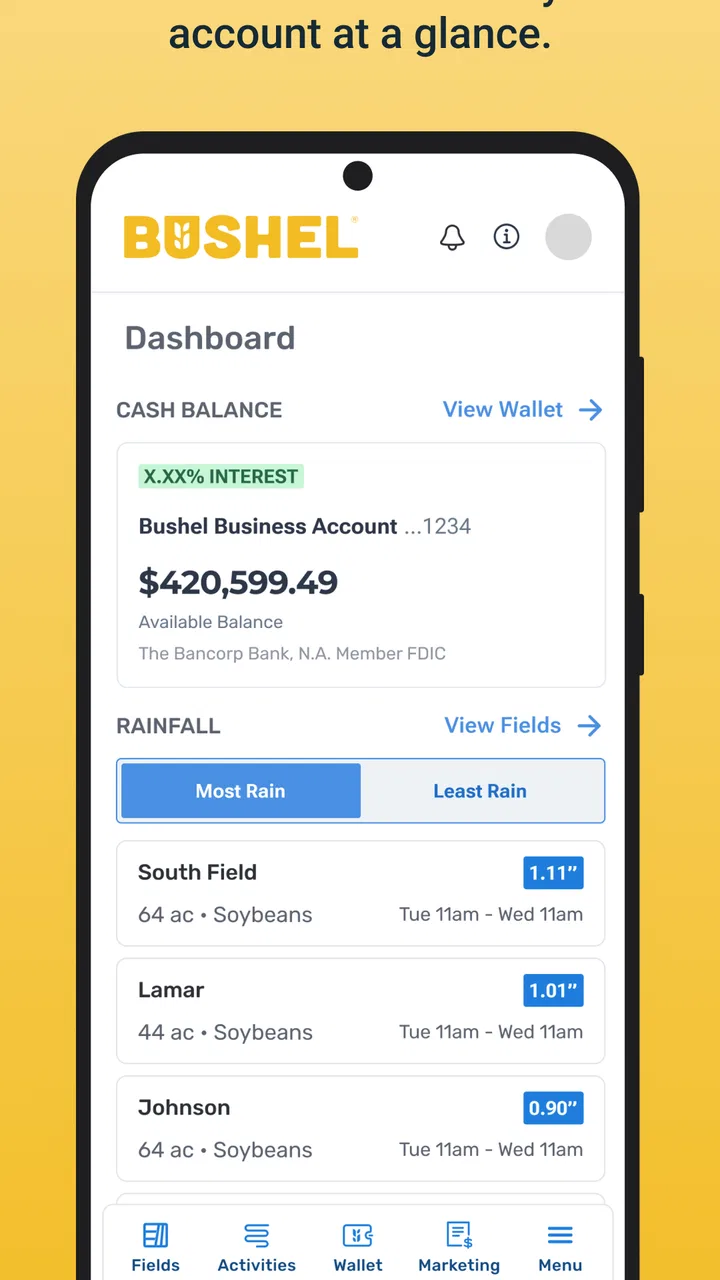
The strongest part of Bushel is its direct connection between farm work and business management. Instead of treating finances as something completely separate from daily operations, it gives the app a practical role in decisions such as checking account activity, reviewing transactions, or keeping track of what needs attention. I found that approach more useful than a generic finance app when the information you need is tied specifically to agricultural work.
You May Also Like

 Blood Strike: 2.5 Anniversary
Blood Strike’s Loadouts Turn Every Drop Into a Tactical Gamble
A close look at Blood Strike’s custom loadouts: how fast access to signature weapons reshapes its battle royale rhythm, rewards preparation, and narrows the gap between fights.

 Pandora - Music & Podcasts
Pandora’s Music Is Easy to Start, but Harder to Recover
Pandora’s strength is its low-effort path from a seed to a station. Its weak spot is how much confidence it asks you to place in connection, setup, and quiet recovery.

 8 Ball Pool
8 Ball Pool Is Built on Rivalries, Rematches, and Routine
A close look at the rivalries, rematches, shared routines, and unanswered safety questions that turn a quick pool match into a persistent mobile community.

 Samsung Music
Samsung Music’s Quiet Strength Is Playing What You Already Own
Its reach comes less from spectacle than from dependable access to a personal library. That simplicity is both the app’s strongest retention engine and its ceiling.

 AccuWeather: Weather Radar
AccuWeather Review: A Quick, Clear Forecast for Everyday Decisions
For everyday plans, the best forecast is the one you can understand quickly. AccuWeather makes rain timing, radar, and local conditions easy to act on, with a few trade-offs.

 Hill Climb Racing
Why Hill Climb Racing Still Turns Crashes Into One More Run
A tiny car, a bumpy hill and one more upgrade: Hill Climb Racing keeps resurfacing because its simple chaos makes every near-miss feel personal.
More From Our News Desk
View All News


Readability matters more here than it might in a casual app. Farm records can contain account names, amounts, dates, balances, and transaction descriptions, and a small mistake in reading one of those details can lead to an unnecessary call or a poor decision. I would use the app with the device’s text-size and display settings adjusted to whatever is most comfortable, then check whether important labels remain easy to distinguish before relying on it during a busy day.
The navigation is most helpful when I already know what I want to check. If my goal is to review a financial movement or confirm the state of an account, a focused visit is likely to be more useful than casually browsing. That is an important distinction for users who find dense business screens tiring: decide on the task first, complete it, and leave rather than trying to explore every area at once.
For someone who prefers large visual cues, simple language, and very little on-screen detail, Bushel may feel more demanding than a basic note-taking tool. A notes app can be made extremely simple, but it cannot provide the same farm-finance context. The trade-off is clear: Bushel offers more relevant structure, while a handwritten notebook or ordinary spreadsheet may feel easier to scan at a glance.
Making the first session less confusing
I would begin by setting up only the information needed for the first real task. For example, if the immediate need is checking recent activity, I would avoid trying to organize every possible record before learning the basic navigation. This reduces cognitive load and makes it easier to tell whether the app actually saves time in your routine.
A useful habit is to compare what appears in the app with a familiar paper record or existing financial workflow during the first few uses. That is not because the app is inherently unreliable, but because every digital system presents information in its own order. Learning where dates, amounts, and descriptions appear can prevent rushed interpretation later.
I also recommend using a quiet moment for setup rather than attempting the first session while driving between jobs, handling equipment, or answering questions from employees. The app is intended to support work, not to replace attention to the work itself. A short, deliberate setup makes it more approachable for people who are not comfortable with mobile finance tools.
Motor, sensory, and cognitive considerations
Bushel is most suitable for users who can comfortably tap through business screens and read detailed financial information. That does not mean it is inaccessible to anyone with motor or sensory limitations, but the practical experience will depend on the phone, display settings, and the user’s tolerance for precision. I would not assume that a person with reduced dexterity will find every control effortless simply because the app is available on a mobile device.
For users with limited fine-motor control, a larger phone or tablet may make the experience easier than a compact handset. Holding the device steady, using a preferred touch technique, and avoiding rushed taps can make a meaningful difference. If a family member or farm office assistant helps with digital tasks, establishing a consistent routine may be more useful than repeatedly searching through the app without a plan.
People with low vision should pay close attention to contrast, text size, magnification, and whether enlarged system text causes any important information to become awkwardly arranged. These are sensible checks for any finance-oriented application, but they matter especially when several numbers appear close together. I would verify a transaction by reading its surrounding context rather than relying on one prominent figure.
For users who are sensitive to visual clutter, the app’s business purpose may be both helpful and challenging. The information is relevant, yet relevance does not automatically make a screen calm. I found that breaking a task into small steps works better than trying to absorb an entire account view at once. Users who experience fatigue or concentration difficulties may benefit from checking one account or one question per session.
Hearing-related needs are less central to this kind of workflow because the core value is visual financial information rather than spoken conversation or audio entertainment. Still, someone who cannot rely on sound should not expect audio cues to be the main way the app communicates. I would treat the visible screen as the primary source of confirmation and avoid assuming that a sound, vibration, or spoken prompt will carry essential meaning.
A realistic day on a working farm
Imagine checking Bushel early in the morning before heading out to inspect a crop. You want to confirm whether a recent financial movement has appeared and decide whether to call the office. In that situation, the app can reduce the need to wait until you reach a desktop computer. The useful workflow is short: open it in a safe place, review the relevant information, note what requires follow-up, and return your attention to the day’s work.
That same scenario also shows the app’s limits. Sunlight, gloves, dust, movement, and interruptions are not ideal conditions for precise financial work. A phone screen may be harder to read outdoors, and gloves can make tapping less accurate. I would use Bushel for a quick check when conditions are reasonable, but I would postpone detailed review until I was stationary and could concentrate.
This matters for users with mobility limitations as well. The freedom to check information away from a desk can be valuable, particularly when walking or traveling around a property is part of the job. At the same time, mobile access is not the same as effortless access. If reaching for the phone, holding it, or switching between tasks is difficult, the app may work better as a planned office tool than as a field companion.
Where the app fits among common alternatives
The usual alternatives are paper ledgers, spreadsheets, desktop accounting software, and general-purpose banking tools. Each has a different advantage. Paper is familiar and flexible, spreadsheets allow custom layouts, desktop systems can support deeper analysis, and banking apps are often optimized for straightforward account checking. Bushel makes the most sense when you want farm-related information handled in a mobile environment rather than spread across unrelated tools.
Compared with paper, the app can make information easier to consult away from a desk and may reduce the need to carry several records. Compared with a spreadsheet, it should feel more purpose-built for its agricultural setting, although that focus may also mean less freedom for users who want to design every category and calculation themselves. Compared with a standard banking app, its value is not simply seeing money move; it is connecting financial awareness with the way a farm business operates.
I would choose a spreadsheet instead if my main requirement were custom formulas, unusual reporting, or complete control over layout. I would choose a general banking application if I only needed basic account visibility and did not need farm-specific context. Bushel is a better candidate when the central question is, “How does this information help me manage the farm?” rather than, “Can I build my own financial system from scratch?”
There is also a cost question that deserves attention. The download is free, but in-app purchases range from around twenty dollars to two hundred dollars per item. That makes it important to understand which parts of the workflow are available without payment and which may require additional spending before adopting it for a whole operation. I would test the free experience first and treat any purchase as a business decision, not an automatic upgrade.
Access in different situations and for different users
Bushel can be useful for farmers, farm owners, office staff, and family members who share responsibility for financial oversight. A person who spends most of the day away from a computer may appreciate having a mobile route to relevant information. An office-based user may value it as a quick companion to more detailed records rather than as a complete replacement for every accounting process.
It may also help households where one person handles field work and another handles finances. A shared routine can reduce the pressure on one person to answer every question immediately. For that arrangement to work well, everyone should agree on what the app is being used for, which information needs a second check, and when a phone review should give way to a fuller conversation or desktop record.
Users who are less confident with technology should not be dismissed as poor candidates. The app’s focused purpose can be easier to learn than a broad accounting platform, provided the first tasks are simple and someone can explain the workflow without rushing. I would introduce it through one repeatable action, such as reviewing a recent item, before adding more responsibilities.
On the other hand, I would skip Bushel if you need a highly customizable accounting environment, a full desktop replacement, or a tool that can be used comfortably without reading detailed financial screens. I would also hesitate if your work conditions make phone interaction unsafe or impractical. A mobile app is not automatically the best option simply because it is available wherever you are.
Practical habits that improve inclusive use
Choose a stable, well-lit place for financial review instead of trying to read the screen while walking, operating equipment, or working in poor visibility.
Use the largest comfortable display available when small labels or closely grouped amounts make checking difficult.
Keep the first workflow narrow: identify the question, review the relevant information, and record any follow-up before leaving the app.
Pair the mobile check with an established paper, spreadsheet, or office process until you are confident that the app fits your routine.
Ask another trusted person to review important decisions when fatigue, glare, gloves, or interruptions make careful reading difficult.
These habits do not add new capabilities to the app, but they make its existing purpose more usable across different abilities and environments. They also protect against a common mistake: treating quick access as permission to make quick decisions. Financial information deserves the same care on a phone as it does on paper or a computer.
Remaining barriers before you commit
The mixed user response is worth taking seriously. An average rating of 2.7 indicates that the experience has not worked equally well for everyone, and written feedback from around one hundred fifty reviewers reinforces the need to approach it with realistic expectations. I would not interpret that rating as proof that the app is unusable, but I would avoid making it the only system for important records until you have tested it in your own operation.
The minimum operating-system requirement is iOS 9, which makes the app potentially relevant to older supported devices. That can help users who do not replace phones frequently, but an older operating system or device may still affect speed, screen comfort, and general ease of use. Before relying on it during a busy season, I would make sure the device itself remains comfortable for reading and tapping.
Another barrier is the difference between a quick mobile view and complete financial management. Bushel’s farm-and-finance focus is useful, but users with complex bookkeeping needs may still need spreadsheets, desktop software, paper records, or professional assistance. Expecting one mobile app to replace every accounting and operational tool can create frustration, especially when the farm has multiple people, accounts, or approval steps.
There is also the human barrier of trust. People are more likely to use a finance app consistently when they understand what they are looking at and when the information fits their existing process. If the layout feels unclear, or if another person in the operation cannot comfortably use the app because of vision, dexterity, language, or confidence issues, adoption may stop with the most technically comfortable user. That is why an inclusive trial should involve everyone who will actually depend on the information.
I would give the app a fair test using ordinary tasks rather than an ideal demonstration. Check information at the time and place you normally work, try it with your preferred display settings, and see whether it reduces effort after several sessions. If the result is still confusing or physically uncomfortable, a simpler alternative may be the more responsible choice even if it has fewer farm-specific features.
My inclusive verdict
Bushel is a focused business app that can make farm finances more reachable for people who need mobile access during a working day. I like its agricultural purpose more than I would like a generic finance tool for this use case, and I can see its value for quick checks, shared routines, and users who move between field and office. Its free entry point also makes a cautious trial possible, although the available in-app purchases mean the total cost should be considered before wider adoption.
Its accessibility is practical rather than something I would describe with broad promises. The experience can be improved through a larger display, comfortable text settings, deliberate sessions, and a clear backup process. However, users who need very simple navigation, extensive customization, hands-free operation, or a complete accounting system may find a different tool better suited to them.
My recommendation is to treat Bushel as a mobile layer for farm and financial awareness, not as an automatic replacement for every record-keeping method. It is worth trying if your main need is to stay connected to relevant farm information away from a desk. I would keep another trusted record during the trial, involve the people who share the work, and judge the app by one question: does it make the next real farm decision clearer without creating a new barrier? If the answer is yes, it can earn a useful place in your routine; if not, a simpler or more customizable alternative will serve you better.
FAQs for Bushel
01What is Bushel and what can I use it for?
Bushel is a mobile platform designed to help users access and manage digital services from one place. Depending on the organization or service connected to your account, it may provide tools for viewing information, completing tasks, receiving updates, or managing account-related activities. Before downloading, check the app listing and your organization’s instructions, since available features can vary by region, account type, and the specific Bushel service you use.
02Is Bushel free to download and use?
The Bushel app can generally be downloaded without an upfront charge, but that does not necessarily mean every service accessed through it is free. Some features may depend on an account, an organization’s subscription, or fees associated with the connected service. After installing the app, review the sign-up information, terms, and any payment details carefully so you understand whether charges may apply to your particular use.
03Do I need an account or invitation to use Bushel?
In many cases, Bushel is intended to connect users with a participating company, organization, or service provider, so simply installing the app may not provide full access. You may need existing login credentials, an invitation, or an account created through an affiliated organization. If you cannot sign in, confirm that you are using the correct email or phone number and contact the relevant provider rather than creating multiple accounts.
04What permissions and personal information does Bushel require?
The permissions requested by Bushel can depend on the features enabled for your account and the services connected to the app. You may be asked to provide contact details, authentication information, or access to notifications and other device functions. Before accepting permissions, read the app’s privacy policy and your device prompts. Only grant access that seems necessary, and review permissions later through Android or iOS settings if needed.
05Will Bushel work without an internet connection?
Bushel is primarily designed for connected use, because many of its functions require communication with online accounts or participating organizations. Some previously loaded information or basic app screens may remain visible temporarily, but you should not expect all features to work offline. For the most reliable experience, use a stable Wi-Fi or mobile-data connection and update the app regularly to receive compatibility and security improvements.
Pros
- Simple interface makes crop and farm records easy to access.
- Useful for tracking field activities from a mobile device.
- Supports better coordination between farm staff and advisers.
- Helps keep operational information organized in one place.
- Can reduce reliance on scattered paper notes and spreadsheets.
Cons
- Some features may require a paid Bushel account or subscription.
- Works best when farm data is entered consistently and accurately.
- Advanced tools can take time for new users to learn.
- Offline functionality may be limited in areas with weak connectivity.
- Not every farm workflow or crop type may be fully supported.

Bushel
Gallery